
How To Extend Battery Life With Proper Laptop Maintenance
Are you tired of watching your laptop battery quickly drain during important projects, video calls, or travel days? Battery deterioration can quickly occur (which leads to shorter run times and constant reliance on chargers). Without proper care, even a new device can start feeling unreliable. The good news is that extending battery life isn't complicated. With consistent maintenance and smart usage habits, you can stretch your battery's performance and keep your laptop dependable when you need it most.

New Life Technology Group gathered information about battery care, thermal management, and preventive practices to help you maximize your laptop's lifespan. This guidance not only saves you money but also reduces electronic waste by delaying premature device replacement.
How To Prevent Computer Overheating
Heat is one of the most damaging factors for laptop batteries. Overheating accelerates chemical aging, reducing capacity over time. By keeping your laptop cool, you protect both battery performance and overall hardware stability.
Ways to Keep Your Laptop Cool:
- Maintain Ventilation - Place your laptop on hard, flat surfaces to allow airflow. Avoid soft surfaces (beds or couches).
- Use Cooling Pads - Laptop stands with built-in fans help dissipate heat during heavy workloads.
- Clean Internal Fans - Dust buildup restricts airflow. Use compressed air to clear vents and fans.
- Manage Apps and Processes - Close unnecessary background apps that overwork your CPU and GPU, generating excess heat.
- Update Software - Firmware and driver updates often include power and thermal optimizations.
By keeping temperatures under control, your battery can function more efficiently, and the entire system experiences less stress.
Preventive Maintenance
Consistent care extends laptop battery longevity. Taking regular small steps adds up to a significant improvement.
- Calibrate Periodically - Fully charge and then drain your battery every few months to help the system read battery levels accurately.
- Avoid Constant Overcharging - Unplug your laptop when it reaches 100% and prevent it from dropping to 0% whenever possible. Ideal levels range between 20% and 80%.
- Store Correctly - If not in use for weeks, store the laptop at around 50% charge in a cool, dry place.
- Use Official Chargers - Third-party chargers can deliver inconsistent voltage, ultimately reducing battery life.
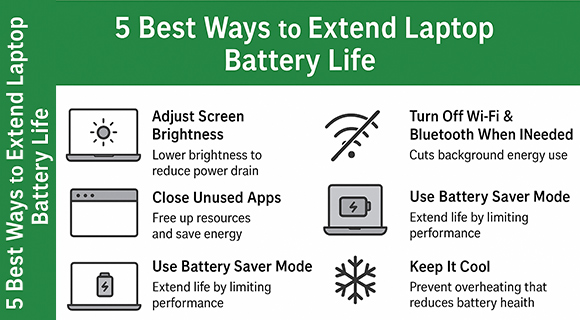
- Optimize Settings - Reduce screen brightness, disable Bluetooth when not in use, and adjust power settings for efficiency.
Preventive measures not only improve battery life but also enhance device performance.
Why Donate Your Old Devices To New Life Technology Group
When laptops or batteries reach the end of their usable life, they often end up collecting dust or being discarded improperly. Donating devices to New Life Technology Group ensures they are either refurbished for extended use or responsibly recycled.
Through their Computers For Kids Program, laptops, tablets, and desktops find new life in the hands of students and families who need access to technology for school or work. Before redistribution, every donated device is securely wiped to protect donor privacy.
This process prevents harmful materials from entering landfills and reduces environmental impact. By donating, you not only free up space in your home but also contribute to digital equity and sustainability. Plus, as a 501(c)(3) nonprofit, donations may qualify as tax-deductible, adding another layer of value for individuals and businesses.
Key Considerations for Extending Battery Life With Proper Laptop Maintenance
Extending laptop battery life is about combining mindful usage habits with ongoing maintenance. The first consideration is temperature control. Heat reduces battery efficiency and accelerates chemical wear. Always maintain proper airflow and avoid high-heat environments.
- Another key point is charge cycle management. Modern lithium-ion batteries prefer shallow cycles, meaning you should keep charge levels between 20% and 80% rather than constantly charging to full (or allowing battery depletion). This practice slows down long-term wear and maintains stronger capacity.
- Calibration is equally important. While batteries do not need frequent deep cycles, running a full charge and discharge occasionally helps the system track battery percentage accurately. This avoids sudden shutdowns or misleading indicators.
- Software optimization also plays a role. Background apps and processes consume unnecessary power. Adjusting power settings, reducing brightness, and disabling idle features can conserve energy and prolong usage time.
- Finally, factor in environmental storage conditions. If storing your laptop for weeks, keep the battery at about half charge and place the device in a cool, dry location. This prevents stress caused by extreme full or empty states.
By applying these considerations, you ensure that your battery operates at peak efficiency for a longer period, reducing the need for costly replacements and maximizing your laptop's reliability.
Extending Battery Life
In this article, you discovered how overheating, poor charging habits, and neglectful storage harm laptop batteries. You also learned strategies for keeping laptops cool, preventive maintenance practices, and why donating old devices to New Life Technology Group benefits both communities and the environment.
By adopting these habits, you can achieve longer-lasting battery performance and reduced stress about charging during important tasks, and the satisfaction of extending your laptop's overall lifespan.
Ignoring this guidance can lead to quicker battery failure, increased costs for replacements, and wasted devices that could have been refurbished for students and families in need. Proactive care keeps your laptop dependable and your impact positive.
PREVIOUS: How To Reset Your Network Switch
START OVER: How To Clean Your Laptop Keyboard Without Causing Damage
Dawsonville, GA 30534
(404) 313-8215